Pwnable.kr/Crypto1
Can you break AES128-CBC cipher? AES128-CBC should be always safe from cracking.
ssh crypto1@pwnable.kr -p2222 (pw:guest)
Analysis
We are provided the files of client.py and server.py
Client.py
1
2
3
4
5
6
7
8
9
10
11
12
13
14
15
16
17
18
19
20
21
22
23
24
25
26
27
28
29
30
31
32
33
34
35
36
37
38
39
40
41
42
43
44
45
46
47
48
49
50
51
52
53
54
55
56
57
58
59
60
61
62
63
64
65
66
67
68
#!/usr/bin/python2
from Crypto.Cipher import AES
import base64
import os, sys
import xmlrpclib
rpc = xmlrpclib.ServerProxy("http://localhost:9100/")

BLOCK_SIZE = 16
PADDING = '\x00'
pad = lambda s: s + (BLOCK_SIZE - len(s) % BLOCK_SIZE) * PADDING
EncodeAES = lambda c, s: c.encrypt(pad(s)).encode('hex')
DecodeAES = lambda c, e: c.decrypt(e.decode('hex'))

# server's secrets
key = 'erased'
iv = '\x5c'*BLOCK_SIZE
cookie = 'erased'

# guest / a488ff12949b87e5c93d489c27217486702b179c060399adf36fc3bc1f5425ec
def sanitize(arg):
	for c in arg:
		if c not in '1234567890abcdefghijklmnopqrstuvwxyz-_':
			return False
	return True

def AES128_CBC(msg):
        cipher = AES.new(key, AES.MODE_CBC, iv)
        return EncodeAES(cipher, msg)

def request_auth(id, pw):
        packet = '{0}-{1}-{2}'.format(id, pw, cookie)
        e_packet = AES128_CBC(packet)
        print 'sending encrypted data ({0})'.format(e_packet)
        sys.stdout.flush()
        return rpc.authenticate(e_packet)

if __name__ == '__main__':
        print '---------------------------------------------------'
        print '-       PWNABLE.KR secure RPC login system        -'
        print '---------------------------------------------------'
        print ''
        print 'Input your ID'
        sys.stdout.flush()
        id = raw_input()
        print 'Input your PW'
        sys.stdout.flush()
        pw = raw_input()

        if sanitize(id) == False or sanitize(pw) == False:
                print 'format error'
                sys.stdout.flush()
                os._exit(0)

        cred = request_auth(id, pw)

        if cred==0 :
                print 'you are not authenticated user'
                sys.stdout.flush()
                os._exit(0)
        if cred==1 :
                print 'hi guest, login as admin'
                sys.stdout.flush()
                os._exit(0)

        print 'hi admin, here is your flag'
        print open('flag').read()
        sys.stdout.flush()
Server.py
1
2
3
4
5
6
7
8
9
10
11
12
13
14
15
16
17
18
19
20
21
22
23
24
25
26
27
28
29
30
31
32
33
34
35
36
37
38
39
40
#!/usr/bin/python2
import xmlrpclib, hashlib
from SimpleXMLRPCServer import SimpleXMLRPCServer
from Crypto.Cipher import AES
import os, sys

BLOCK_SIZE = 16
PADDING = '\x00'
pad = lambda s: s + (BLOCK_SIZE - len(s) % BLOCK_SIZE) * PADDING
EncodeAES = lambda c, s: c.encrypt(pad(s)).encode('hex')
DecodeAES = lambda c, e: c.decrypt(e.decode('hex'))

# server's secrets
key = 'erased'
iv = '\x5c'*BLOCK_SIZE
cookie = 'erased'

def AES128_CBC(msg):
    cipher = AES.new(key, AES.MODE_CBC, iv)
    return DecodeAES(cipher, msg).rstrip(PADDING)

def authenticate(e_packet):
    packet = AES128_CBC(e_packet)

    id = packet.split('-')[0]
    pw = packet.split('-')[1]

    if packet.split('-')[2] != cookie:
        return 0
    if hashlib.sha256(id+cookie).hexdigest() == pw and id == 'guest':
        return 1
    if hashlib.sha256(id+cookie).hexdigest() == pw and id == 'admin':
        return 2
    return 0

server = SimpleXMLRPCServer(("localhost", 9100))
print "Listening on port 9100..."
server.register_function(authenticate, "authenticate")
server.serve_forever()
We also have been given a readme which states:
client.py running at nc 0 9006
server.py running in background
break the password and get flag!
After going through the code, we can understand that the client.py will be used to take the information from the user. This information will go through a series of changes which will be evaluated by the server.py .
Looking through the code of client.py closely, I noticed that the program was allowing the user to input even the ‘ - ‘ character. This could allow the user to submit their own cookie which would easily give us the flag. But on further inspecting the server.py , the program is checking whether the cookie sent from the user side matches the cookie that was set by the program thus not the correct approach :(
Later on I remembered that since we could control the data that could be sent before the cookie, we could perform a simple wordlist attack to leak the cookie :)
Exploit.py
1
2
3
4
5
6
7
8
9
10
11
12
13
14
15
16
17
18
19
20
21
22
23
24
25
26
27
28
29
30
31
32
33
34
35
36
37
38
39
40
41
42
43
44
45
46
47
48
49
50
51
52
import pwn
from pwn import *

def only_part(a,block):
    print(f"Only part argument:{a}")
    cnt=1
    b=a[block*32:(block+1)*32]
    b=int(b.decode(),16)
    return b

BLOCK_SIZE=16

letters='1234567890abcdefghijklmnopqrstuvwxyz-_'

wordlist={}

cookie=""

while len(cookie)<29:
    block=1 if len(cookie)>=14 else 0

    password=13 # Initial length is taken as 13 to consider the additional '-' which come after user and password
    password=password+block*BLOCK_SIZE
    password-=len(cookie)

    p=remote("127.0.0.1",9006)

    content=b"\n"+(password)*b"-"
    print(f"Content being sent:{content}")

    p.sendline(content)
    _=p.recvuntil(b"sending encrypted data ")
    encrypted_data=p.recvline()[1:-2]
    a=only_part(encrypted_data,block)
    print(f"encoded part is:{hex(a)}")

    for i in range(0,len(letters)):
        p=remote("127.0.0.1",9006)
        content=b"\n"+(password+1)*b"-"+cookie.encode()+letters[i].encode()
        print(f"Content being sent:{content}")
        p.sendline(content)
        _=p.recvuntil(b"sending encrypted data ")
        encrypted_data=p.recvline()[1:-2]
        encrypted_data=only_part(encrypted_data,block)
        print(f"Encoded part for letter {letters[i]}:{hex(encrypted_data)}")
        wordlist[letters[i]]=encrypted_data
        if a==encrypted_data:
            print(f"Cookie index {len(cookie)}:{letters[i]}")
            cookie+=letters[i]
            wordlist={}
            break
Output (Cookie leaking)
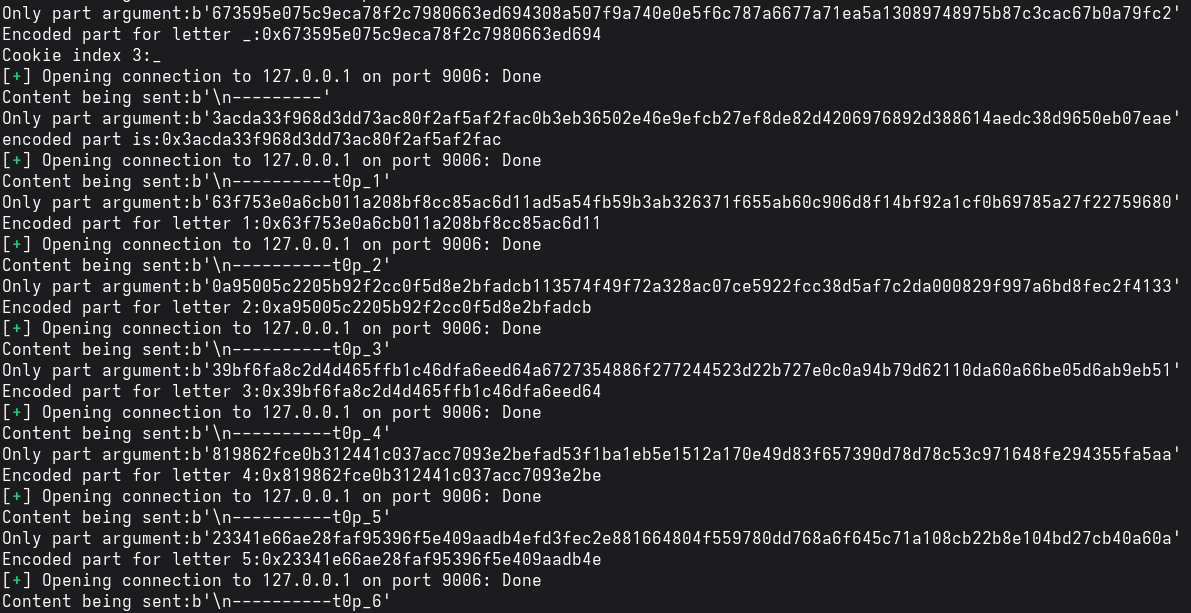
Just keep the program running for some time and it will leak out the cookie.
Then we just have to create a hash for the admin which matches the password of admin
1
2
3
    import hashlib
    cookie=b"get_it_yourself"
    print(hashlib.sha256(b"admin"+cookie).hexdigest())
Output (Creating hash)

After this just put “admin” as the user and the obtained hash as the password and we get the flag. 